ShrinkIt
Batch-compress images and PDFs on your PC.
What's included
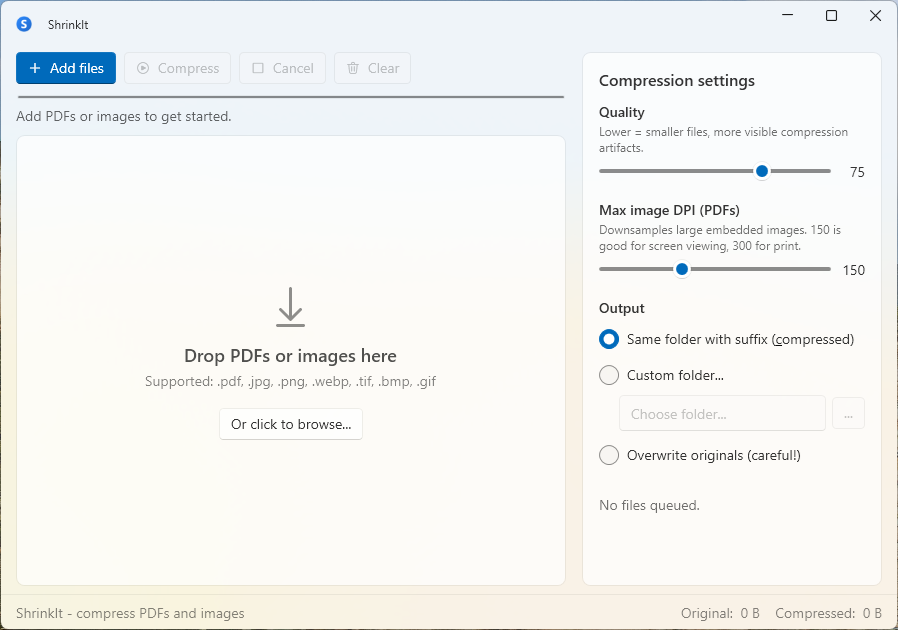
- Queue files, or drop a folder including its subfolders
- Compress JPG, PNG, WebP, TIFF, BMP, GIF, and PDF
- Quality slider plus a PDF image DPI cap
- Save beside the original, to another folder, or over the original
- Per-file progress, size, and savings
- Fully offline — files never leave your PC
System requirements
- Windows 10 version 20H2 or later, or Windows 11 (64-bit)
- 4 GB RAM (8 GB recommended for very large batches)
- 120 MB free disk space
Recent updates
- v1.0.0 · Sep 23, 2026
- First commercial release
- 14-day trial and Lemon Squeezy license activation
- Signed installer with optional updates
Why ShrinkIt
Cameras and phones produce large images, and exported PDFs often carry uncompressed pictures. ShrinkIt is for people who want to shrink a pile of those files locally, without uploading them.
How it works
Drop files or a folder onto ShrinkIt. It queues JPG, PNG, WebP, TIFF, BMP, GIF, and PDF files, then compresses them with the quality and PDF DPI settings in the sidebar. Results can sit next to the originals (with a _compressed suffix), go to a folder you choose, or replace the originals.
Image compression strips metadata, including EXIF and ICC profiles, so the smaller file does not keep the camera or color-profile data from the original. If a compressed file is not smaller, ShrinkIt keeps the original bytes.
Common use-cases
- Preparing a folder of screenshots before they go on a site
- Shrinking a photo export before you send it to a client
- Reducing the size of PDFs that are mostly embedded images
Fair pricing
€19 is a lifetime license for ShrinkIt 1.x, including later 1.x updates. The download is the full app. It runs as a trial for 14 days from the first launch on that PC, with no account required. After the trial, compress stays locked until you activate the license key from your receipt in the sidebar.
Ready to try ShrinkIt?
14-day free trial, full features, no account required.